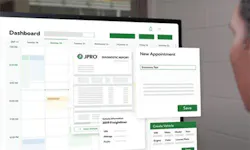
Learn about Noregon's 30-year history helping the industry maximize uptime and advance technician skillsets. OTHER Learn about Noregon's 30-year history helping the industry maximize uptime and advance technician skillsets. OTHER Get diagnostics tips, training updates, and product updates delivered to your inbox. Repair shops already have enough on their plates—diagnosing vehicles, turning wrenches, tracking down parts, updating customers, sending invoices…the list doesn’t get shorter. Add manual paperwork and clunky invoicing to the mix, and the day fills up fast. Noregon’s shop management software ShopPulse helps shops cut the clutter and ease the pressure. It streamlines the busywork so technicians can spend less time managing paperwork — and more time getting trucks back on the road. If you’re already using JPRO , you’ve likely seen what the right tools can do — shorter dwell times, faster turnaround, and a more consistent diagnostic process. Extending that same efficiency beyond diagnostics just makes sense. Bringing JPRO and ShopPulse together helps create a smoother workflow from the first scan to the final invoice — connecting your diagnostic process with work orders, invoicing, and day-to-day shop operations. Importing JPRO Diagnostic Scans into ShopPulse For ShopPulse customers, active JPRO users already have the upper hand. With ShopPulse, you can import JPRO scans to include within your work order, choose which faults to add, create an estimate with specific customer/service/job details, and better inform customers with details like fault descriptions. Instead of duplicating your work or switching between the two tools, ShopPulse allows you to add your JPRO diagnostic data directly into your work order process. Saving time, preventing clerical errors, and turning diagnostic reports into completed repairs. With JPRO integration, your shop can: Import Diagnostic Reports Select Specific Faults Easily Include Job Descriptions and Fault Data With this integration, your shop lowers the chance of mistyped VINs or incorrect vehicle details, and creates an overall smarter approach to shop management. How to set up in ShopPulse In ShopPulse, click General, navigate to Shop Admin, and copy your assigned shop code. In JPRO, click Application Settings, then Preferences. Choose ShopPulse from the menu and enter your assigned shop code. Once complete, you’ll be able to sync JPRO diagnostic scans to ShopPulse, either from a live vehicle connection or from vehicle history. How to Submit JPRO Diagnostic Scans to ShopPulse In JPRO, click Submit Repair, then Submit to ShopPulse. Verify the vehicle information for submission, adjust the odometer if necessary, and click Accept. In ShopPulse, all JPRO scans will appear under the JPRO Scans tab in the Work Order section. Scans are listed by date and can be filtered by report type, and date/time range. Experience the ShopPulse Difference A Modern Approach to CAN Bus Diagnostics Why traditional CAN bus diagnostics fail and how modern diagnostics identify faults faster. Guide to CARB’s Clean Truck Check Learn about California’s Clean Truck Check program and how to stay compliant with new requirements. A Technician’s Guide to DPF Regens Learn the importance of DPF regens and the costs and consequences of running them unnecessarily. Small Town Shop Offers Big-Time Services Learn how Van Cleef Auto Parts uses TaaS to provide leading service, versatility, and customer satisfaction. This whitepaper explores the 2026 economic outlook, industry trends, and customer research findings. 10 Steps Before Clearing Fault Codes Learn the 10 steps to take before clearing a fault code to avoid recurring issues. Streamline the Diagnostic Process As shops take inventory of their diagnostic tools, it's vital to consider the importance of tech-to-tool ratios. Differences Between OE and SAE Fault Codes Learn the differences between OE and SAE fault codes and how JPRO can simplify fault code analysis. Ways to Recruit & Retain Skilled Truck Drivers Explore the most effective ways to recruit and retain the backbone of the American economy: truck drivers. ©Noregon. JPRO, NextStep, and TripVision are registered trademarks of Noregon. All Rights Reserved.