Paccar Connect brings the ‘smart car’ experience to Kenworth and Peterbilt cabs
Key takeaways
- Standard equipment for 2027: Paccar Connect will come factory-installed on most 2027 Class 8 Peterbilt and Kenworth trucks, featuring ergonomic 13-inch portrait or 15-inch landscape displays.
- Seamless fleet integration: Powered by the Platform Science Virtual Vehicle ecosystem, the system runs electronic logging devices (ELDs), enterprise fleet apps, and Apple CarPlay directly through the dash to eliminate aftermarket cab clutter.
- Actionable native diagnostics: The platform includes four subscription-free native apps—most notably a Vehicle Health tool that translates complex fault codes into plain-language diagnostics to help drivers and fleet managers reduce downtime.
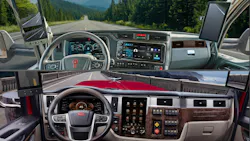
CHARLOTTE, North Carolina—Commercial truck cabs increasingly feel like modern cars, with more comfort, smoother handling, and built-in driver technology. Paccar is reducing technology clutter by factory-integrating modern infotainment displays similar to those standard in consumer vehicles but designed for truckers.
Paccar will make the Paccar Connect platform standard on most Class 8 equipment models across Peterbilt and Kenworth trucks beginning in early 2027. Designed as a unified digital bridge between the driver and back-office management, Paccar Connect pairs factory-warrantied hardware—featuring high-definition in-cab displays—with Platform Science’s Virtual Vehicle open-application ecosystem and a dedicated suite of native vehicle tools.
“By creating a future-ready technology foundation, it enables us to continuously expand capabilities, integrate new technologies, and enhance the driver experience,” John Rich, Paccar chief technology officer, said.
What is in Peterbilt and Kenworth’s Paccar Connect platform?
Paccar Connect shares a standardized software architecture, back-end telematics pipeline, and four native diagnostic apps across both nameplates, with a distinct look for Kenworth and Peterbilt cabs.
Paccar Connect
- Virtual vehicle software ecosystem
- Factory-integrated telematics pipeline
- Four native apps requiring no subscription
- Voice assistant featuring more than 250 commands
Peterbilt cabs
- Models: 579, 589, 567 (excluding car hauler)
- 13-inch portrait screen
- Physical “knob-on-glass” interface for HVAC and volume control
Kenworth cabs
- Models: T880, T680, vocational lineup
- 15-inch landscape panel
- Tactile HVAC dials for HVAC and volume
The announcement, made here during the American Trucking Associations’ (ATA's) management conference on October 19, represents Kenworth and Peterbilt’s significant push to eliminate the sprawling patchwork of aftermarket suction mounts, third-party ELD tablets, and secondary display screens currently crowding heavy-duty cabs. It’s more than a display, though; drivers can access vehicle health diagnostics to better understand maintenance needs.
“The nice thing about this is a driver gets this issue at 2 a.m. They go, ‘Hey, look, it’s actually not that big of a deal. I don’t need to get my truck in tonight ... I’ll keep going on with my day,’” Chase Wolf, Peterbilt marketing segment manager, said. “Without going anywhere, calling anybody, or plugging anything in, they have all the information at their fingertips to understand the problem and the solution.”
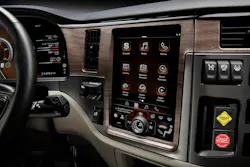
The technology allows drivers to run their Apple CarPlay ecosystem and favorite apps right through the truck, while their phone sits snugly on the wireless charging pad beneath the display.
 trucking's top industry issues 2026 thumbnail
 Kenworth C580 Winch Tractor
Peterbilt: 13-inch portrait display
Previewed earlier this month in Sonoma, California, Peterbilt’s version features a 13-inch portrait-oriented touchscreen anchored in the center dash stack.
Recognizing that truck drivers often need tactile touchpoints while rolling over uneven road surfaces, Peterbilt engineers integrated a physical “knob-on-glass” directly into the lower display. The multifunction dial uses notchy, mechanical detents to control cab temperature, fan speed, and audio volume without taking eyes off the road. Below the dynamic app window, permanent HVAC and media controls stay on screen so drivers don’t have to dig through submenus to adjust the defroster or AC.
Peterbilt also rolled out an integrated voice assistant activated by steering wheel controls or by speaking “Hey Peterbilt.” The assistant recognized more than 250 native voice prompts in English, French, and Spanish, translating conversational phrases like “I’m cold” into automatic HVAC adjustments.
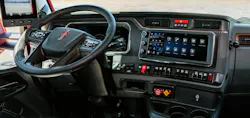
Kenworth: 15-inch landscape display
At Kenworth, the brand previewed a 15-inch landscape display during a vocational drive program this summer. It is also integrated into the center dash stack.
Kenworth’s human-machine interface (HMI) team kept dedicated, tactile rotary dials immediately beneath the screen for fan speed, temperature, and volume to accommodate vocational operators wearing heavy work gloves.
The screen is split into two functional zones: a fixed left-hand frame with essential truck and climate controls that never change, and a dynamic right-hand plane for active workflows, navigation, and fleet apps. Ergonomically, the housing extends slightly from the dash with a bottom bezel lip, giving drivers a sturdy resting spot for their hand or thumb to steady input while operating.
Native core apps: Turning fault codes into actionable data
Both OEMs ship Paccar Connect with four pre-loaded, subscription-free native applications.
- Vehicle health: Bypasses basic fault lights to deliver clear diagnostic language directly to the screen. Instead of leaving a driver stranded with a vague check-engine light, the app breaks down the fault code, outlines potential root causes, grades severity, and clearly tags whether the driver can inspect the issue (such as topping off low coolant) or needs a certified technician. Fleet managers see the same diagnostic context in the Paccar Connect back-office portal.
- Digital operator’s manuals: The display provides a fully indexed, keyword-searchable repository of the truck’s full manual.
- Driver tutorials: On-demand video walkarounds and how-to modules covering cab functions and pairing steps. View videos directly on the center console or access them via an on-screen QR code on a smartphone.
- Dealer locator: GPS-driven routing to certified Kenworth or Peterbilt service locations, displaying operating hours, real-time distance, phone contacts, and one-touch calling.
Platform Science ecosystem and camera integration
Beyond native features, Paccar Connect functions as a hardware gateway to Platform Science’s Virtual Vehicle platform. Fleet managers can configure, push, and manage approved enterprise applications—ranging from electronic logging devices (ELDs) and driver vehicle inspection reports (DVIRs) to fleet-specific dispatch systems—directly through the Paccar Connect portal.
- Camera flexibility: The platform supports up to eight camera inputs (four digital high-definition inputs and four analog feeds). Fleet managers and drivers can configure multi-camera views (split-screen, triple, or quad displays) and set functional triggers, such as auto-launching side-mirror blind spot views upon signaling or displaying a fifth-wheel/trailer hitch feed when shifting into reverse.
- Phone pairing and projection: Apple CarPlay comes fully integrated. Android devices currently connect via Bluetooth for calls and media streaming (native Android Auto phone projection is not currently supported). Still, dual-phone Bluetooth pairing lets team drivers separate calling and media playback seamlessly. Fleets also retain the back-office ability to lock out phone projection or restrict specific interactive features when the truck is in motion.
About the Author
 Josh Fisher
Josh Fisher
Editor-in-Chief
Editor-in-Chief Josh Fisher has been with FleetOwner since 2017. He covers everything from modern fleet management to operational efficiency, artificial intelligence, autonomous trucking, alternative fuels and powertrains, regulations, and emerging transportation technology. Based in Maryland, he writes the Lane Shift Ahead column about the changing North American transportation landscape.